Create Your First Project
Start adding your projects to your portfolio. Click on "Manage Projects" to get started

Movie App
Designed for:
Personal Project
🎬 Case Study: Cinematic - Movie Ticket Booking App
Overview
Cinematic is a modern mobile app designed to let users browse movies, choose showtimes, reserve seats, and access digital tickets in a seamless, visually immersive way. 🍿✨
This concept focuses on bold visuals, glowing neon accents, and a smooth booking flow that feels exciting and effortless - just like going to the movies.
My Role: UX/UI Designer
Tools: Figma
Deliverables: Movie discovery screen, movie details page, seat selection flow, digital ticket screen
Problem
Many movie-booking apps feel outdated, cluttered, or overly functional with little personality. Users often struggle with:
- Hard-to-read showtimes
- Confusing seat maps
- Boring booking flows
- Lack of visual excitement
The goal was to design an app that feels modern, cinematic, and highly intuitive.
Goals
- Create an entertaining, visually immersive UI experience 🎨
- Simplify the process of browsing movies and choosing showtimes
- Make seat selection clear and easy to understand
- Provide a sleek, scannable mobile ticket for quick access at the theater
- Use color, contrast, and neon highlights to enhance excitement
Research Insights
From studying popular cinema apps:
- Users prefer large imagery to quickly identify movies
- Clear separation between Now Playing and Coming Soon improves browsing
- A color-coded seat map makes selection effortless 🎟️
- A digital ticket must be readable, visually appealing, and scan-friendly
These insights shaped the visual system and flow.
Design Approach
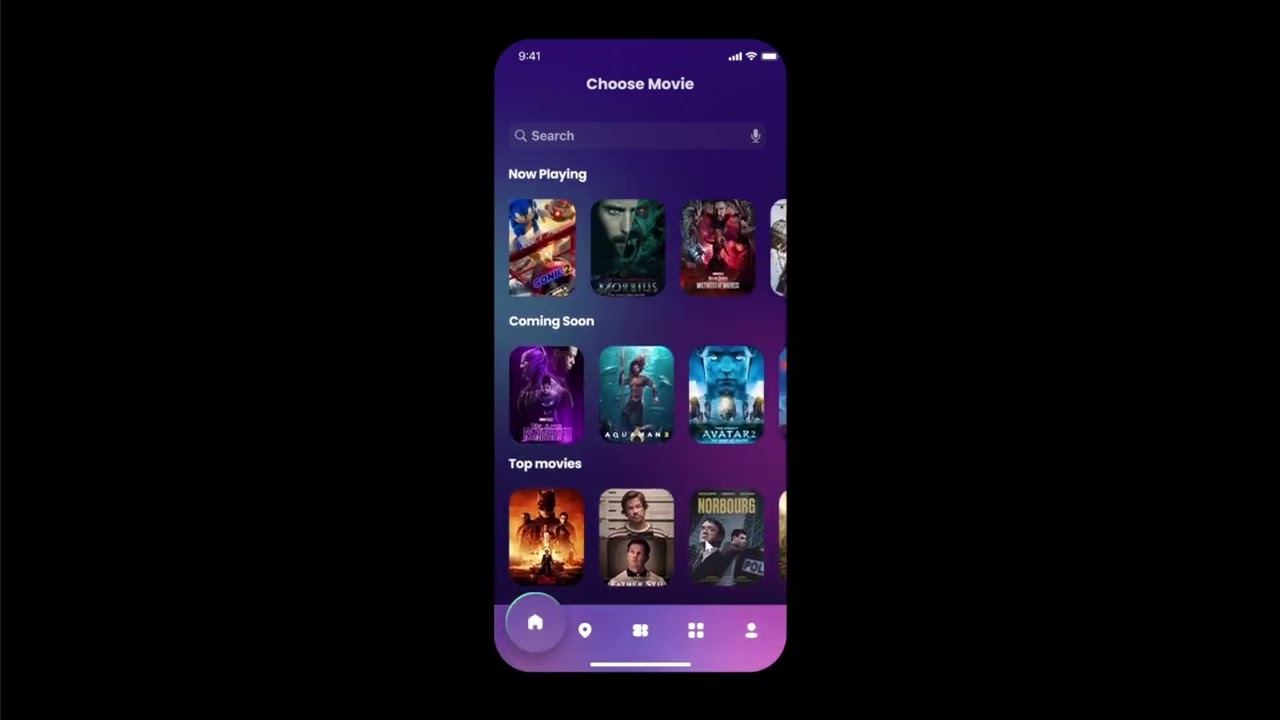
1. Movie Discovery
The first screen focuses on visually engaging browsing:
- “Now Playing” and “Coming Soon” sections for quick scanning
- Large, vibrant poster thumbnails for recognition
- A bottom navigation bar for smooth app-wide movement
- A dark, gradient-based theme to evoke a cinematic atmosphere 🌌
This setup makes it easy to explore what’s currently available.
2. Movie Details
The details screen highlights the selected film using:
- A full-width background image
- A clean summary and storyline preview
- Selectable showtimes and dates wrapped in glowing neon UI elements
- A clear “Reservation” button to guide user flow 🎯
The visuals are designed to pull the user into the film’s world.
3. Seat Selection
The seat selection interface emphasizes clarity:
- Color-coded seats: available, reserved, selected
- A structured seat grid with enough spacing for easy tapping
- A glow accent to simulate the feel of theater lighting
- A summary panel showing date, time, and pricing 💺
This creates a booking flow that is both functional and enjoyable.
4. Digital Ticket
Once booked, users receive a modern digital ticket:
- A large, stylish card layout displaying the movie’s artwork
- Clear showtime, row, and seat numbers
- A scannable barcode for theater entry
- A centrally placed CTA and bottom-nav continuity
The ticket feels premium and is easy to access during check-in.
UI Decisions
- Purple & blue gradients evoke a modern, cinematic look 🎥
- Neon pink highlights guide the eye toward interactive elements
- Large artwork strengthens emotional connection
- Rounded buttons add friendliness and reduce visual tension
- Clean typography ensures readability even with complex visuals
Outcome
This app concept achieves:
- A visually stunning, immersive movie-booking experience
- Faster and clearer seat-selection and scheduling
- A beautiful digital ticket that users enjoy showing at the theater
- A consistent, entertainment-inspired design language ✨
Reflection
Designing this app allowed me to explore how emotion + usability can coexist.
I focused on balancing strong visual identity with functional clarity, especially in areas like seat mapping and ticket layout.
Next improvements:
- Add transition animations for a more dynamic feel 🎞️
- Expand filters (genre, formats, languages)
- Add user ratings and reviews for social proof